
Setup Actions feature allows you to setup certain behavior on some data change in the table.
Setup Actions feature allows you to set certain behavior on some data change in the table. This feature is available in panels:
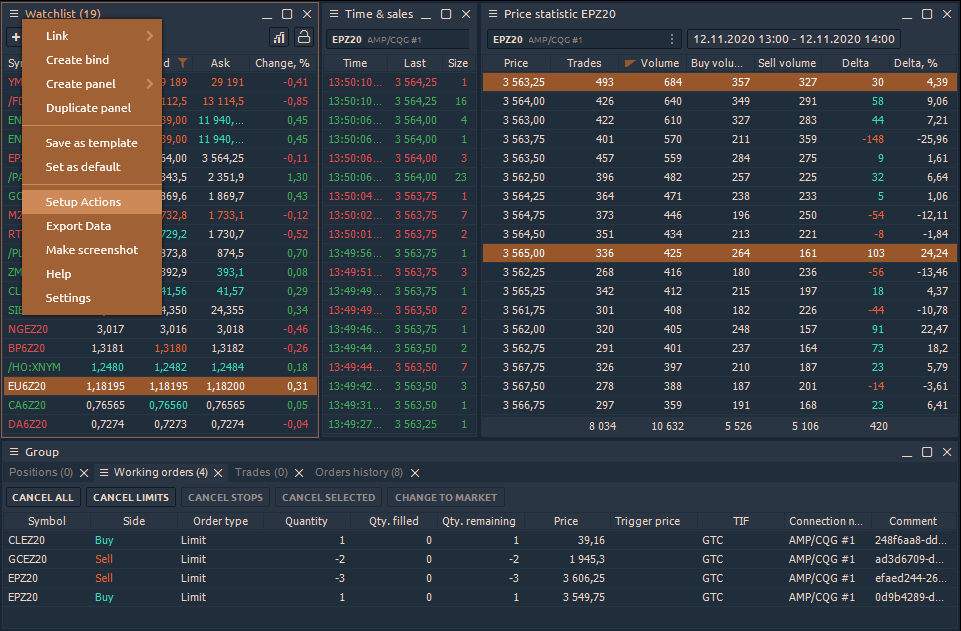
Setup Actions consists of two options:
Actions
Currently, Quantower tables support four types of actions:
The Table actions functionality can be found under the panel’s context menu option “Setup Actions” and once launched, it opens an “Actions screen”, where you can manage your Actions. The process of Action creation is not complicated.
Table actions tasks
Once some condition is met, action will execute the corresponding tasks. Each task will be executed as many times, as the condition was met.
Show message | Displays a popup box with the user-specified message |
Play sound | Plays some user-selected sound file |
Color row | Changes the styling of the whole row, where the condition was met. Allows changing the background and/or text colors. |
Color cell | Changes the styling of the specified cell(s) of the row, where the condition was met. Allows changing the background and/or text colors. |
Table filters
Rows in the table can be filtered by some data values in their column. There are two ways to apply the filtering:
- Quick filtering can be accessed by clicking the “Filter” icon in any table column’s header.
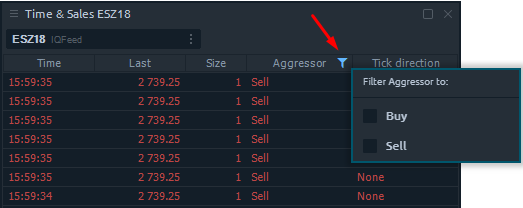
Once you select some option — the table rows will be filtered to those ones, containing the selected value. Quick filter can be canceled by pressing “Cancel filtering” option.
Quick filtering can be applied only to one column of the table. For filtering multiple columns, we recommend using “Setup actions”.
- Advanced filtering, for applying more complex filtering (multi-filtering). Select in the panel's context menu option “Setup actions”.

This screen has two tabs on the left side, where the first one is an Advanced filter.

This screen allows you to Enable/disable filtering as well as set up filtering Conditions. These conditions are set up as:

You can setup as many conditions as you like. Due to the possible complex logic of filtering, you are required to apply the changes once you finished the filter set up.